Blog
7 Digital Signage Tips for the Cultural Sector: Make Your Screens Work for You
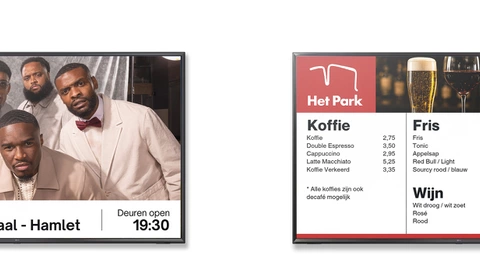
An evening at the theater, the playhouse, or a concert venue is all about the experience. A performance that moves you, a concert that stays with you, an experience you’ll never forget. But that magic doesn’t happen on its own. Behind the scenes, everything has to be just right: ticket sales that run smoothly, intuitive wayfinding, and communication that’s always up-to-date and relevant.
Digital signage can help the cultural sector achieve this. With digital screens, you not only share information but also automate processes, prevent repetitive questions, and enhance the visitor experience. This ensures visitors receive the right information at the right time, while your organization saves time.
Yet, in many cultural institutions, screens are still updated manually. Event calendars, current ticket information, and practical visitor information require constant attention. There’s a smarter way. By integrating with platforms such as Yesplan, Eagerly, Peppered, Ovatic, or your website, content is updated automatically. This ensures your screens are always up to date and allows you to add new information quickly.
Below, we share 7 practical digital signage tips that theaters, playhouses, and concert venues can use to make their screens work for them.
Learn more1. Plan your content in advance
- Recurring content, such as house rules, sponsor announcements, and partner communications.
- Templates for opening hours, ticket information, and announcements.
- Content for the coming days or weeks that aligns with the programming.
- Content for a specific event.

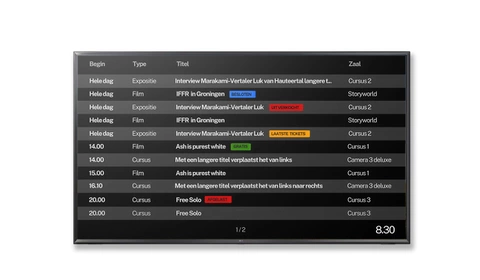
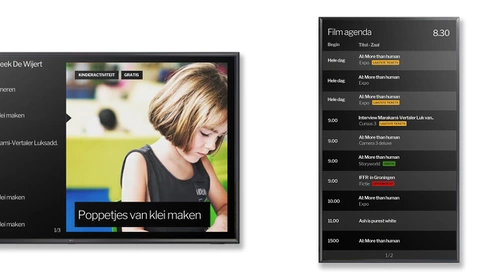
2. Display your calendar automatically and keep it up to date
Manual adjustments are no longer necessary
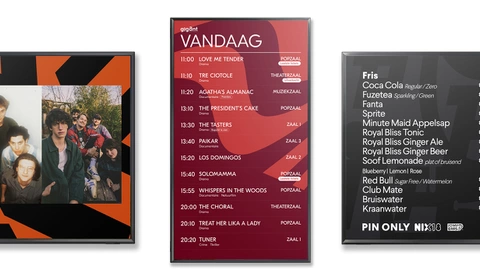
The calendar is automatically updated as soon as something changes. This offers several advantages:
- Up-to-date information on screen— even when there are changes to the schedule.
- Fewer questions at the information desk or reception.
- Greater visibility —upcoming performances and events stand out.
- Automatic cleanup —past events automatically disappear from the screen, so visitors see only relevant and up-to-date information.
3. Show similar performances
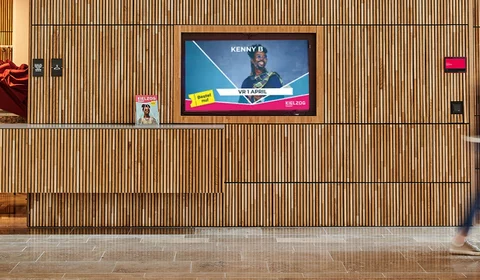
A visitor who walks out of the auditorium full of enthusiasm is open to more. That’s the perfect moment to showcase featured performances, show promos, or the program lineup on screens in the lobby, at the bar, or near the exit.
Did someone attend a cabaret show? Then showcase other cabaret nights. Was it a dance performance? Show which dance productions are coming up soon.
Learn moreAutomate with Categories and Tags
- Categories: cabaret, dance, family shows, jazz, theater, pop.
- Tags: age, target audience, and lifestyle.
4. Use screens for dynamic wayfinding
Cultural venues often have multiple auditoriums, floors, bars, coat check areas, and entrances. This can be confusing, especially for first-time visitors. With digital signage, you can use screens as digital wayfinding tools, helping visitors easily find their way. Consider displaying information about:
- The Path to the Right Venue
- Coat check areas, restrooms, bars, and exits
- The current start time of a performance
- Emergency Exits and Evacuation Routes
Dynamic wayfinding goes beyond a static map. By linking screens to your schedule, ticketing system, or website—for example—the information is automatically updated based on the current program. For a major performance, this allows you to automatically display additional coat check areas, bars, or walking routes. For a smaller performance, you can direct visitors to the nearest facilities.
This way, visitors always receive relevant directions, and staff members don’t have to answer the same questions as often.
Learn more5. Display up-to-date ticket information
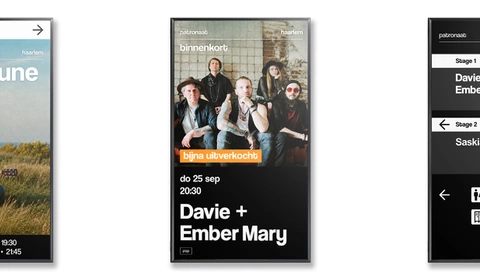
- “10 tickets left”
- “Last Tickets”
- “Sold Out”
- Last-minute deals
- Promotions or Discounts
- Highlight shows that are almost sold out or about to start (you can still save these)
Integrate your ticketing system
By linking to your ticketing system or website, this information stays up to date automatically. This prevents disappointment, reduces inquiries at the ticket counter, and makes it easier to highlight available tickets.
Learn more6. Take the pressure off the front desk
The reception desk is often the first point of contact for visitors. This is where many practical and recurring questions come in. You can easily answer a large portion of them using screens. You can also display up-to-date, easily customizable price lists or have them updated automatically via a link to the point-of-sale system.
Consider questions such as:
- Where is the coat check?
- Where are the restrooms?
- Can I pay with my debit card here?
- What time does the performance start?
- Can I still buy tickets?
- What are the house rules?
- Can I bring my own food and drinks?
Display this information on a screen near the entrance or reception area. This way, visitors get immediate answers, and staff can focus on personal questions and situations that require extra attention.
Learn more7. Let people know when the doors open
- "Doors for Performance X open in 5 minutes"
- "The show starts in 10 minutes."
- "Please take your seats in the auditorium."
- "The doors are closed. Unfortunately, it is no longer possible to enter the venue."
Countdown to the performance
A countdown to the start of a performance can also be helpful. By linking this information to your scheduling software or website, the start time is automatically updated. This provides clarity for visitors and helps reduce crowding at the entrance.
Learn moreLet Digital Signage Do the Work
Digital signage doesn’t have to be an extra administrative task. With the right integrations, you can have schedules, ticket information, wayfinding, and visitor communications appear automatically on your screens.
Cultural venues often use various types of screens, ranging from landscape and portrait screens to small displays, digital sidewalk signs, and LED walls. With digital signage, you can manage all these screens from a single central platform, while the content is automatically tailored to the format and location. This saves time, reduces the risk of errors, and ensures that visitors always see relevant and up-to-date information.
Spark Narrowcasting helps cultural institutions with user-friendly digital signage and smart integrations. From event schedules and ticket sales to dynamic wayfinding and visitor information—here’s how to make your screens work for you.
Learn moreYour partner in digital signage
At Spark Narrowcasting, we’ve been happily providing this service for years to a variety of companies and organizations, including those in healthcare, education, government, and culture. Our reliability, security, and user-friendliness make us the ideal partner for your digital signage needs.
Curious about what digital signage can do for your theater, playhouse, or concert venue?
Contact us or check out our solutions for the cultural sector.
Spark Narrowcasting – smart screens, less work.
Please contact us