March 27, 2025
Quick communication at crucial moments with the calamity module
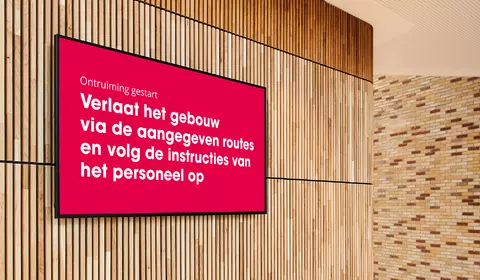
In any organization, a time may arise when quick and reliable communication is critical. Suppose a fire drill is planned or an evacuation suddenly needs to take place. How do you quickly and effectively inform your employees, visitors or patients about the situation? This is where the emergency module in our application comes in handy. Using this module, selected slides can be prioritized and displayed directly on the screens, giving them priority over other content.
Learn more
Calamity module
Direct information dissemination in the event of an emergency
Unlike the standard procedure of placing slides in channels, our calamity module offers the possibility of placing slides directly on selected screens. The selected calamity slide overrides all other slides normally displayed on the selected screens.
Learn moreHow it works
How does it work?
It works simply: go to the 'Calamities' menu and select the 'plus icon' to create a new slide. Depending on the chosen format, add the necessary text, colors and images. After the content is set, specify which screens or screen groups you want this slide to be displayed on. Within seconds, the slide will be displayed on the chosen screens.
Learn moreAdditional tip
An extra tip: Prepare in advance by setting up screen groups under the 'Screen Groups' menu. In case of an emergency, you then only need to check the screen group for faster display of the relevant slide. Our emergency module is there for moments when immediate communication is crucial. If you are not yet using this feature, please contact the organization administrator within your company.
Learn moreManual
Manual
Want more information about the emergency module? Visit the manual in Spark Narrowcasting. There you will find a detailed description so you can get started right away.
Learn more